Thursday, August 3, 2023

Kafka messaging with Python & Polylith

This article isn't about Franz Kafka or his great novella The Metamorphosis, where the main character one day realizes that he has transformed into a Human-size Bug.

It is about a different kind of Kafka: Apache Kafka, with examples on how to get started producing & consuming messages with Python. All this in a Polylith Monorepo (hopefully without any of the bugs from that Franz Kafka novella).

This article can be seen as Part III of a series of posts about Python & Polylith. Previous ones are:

  1. GCP Cloud Functions with Python and Polylith
  2. Python FastAPI Microservices with Polylith

If you haven't heard about Polylith before, it's about Developer Experience, sharing code and keeping things simple. You will have all your Python code in a Monorepo, and develop things without the common Microservice trade offs. Have a look at the docs: Python tools for the Polylith Architecture

Edit: don't know what Kafka is? Have a look at the official Apache Kafka quickstart.

I will use the confluent-kafka library and have read up on the Confluent Getting Started Guide about writing message Producers & Consumers.

The Polylith Architecture encourages you to build features step-by-step, and you can choose from where to begin. I have an idea about producing events with Kafka when items have been stored or updated in a database, but how to actually solve it is a bit vague at the moment. What I do know is that I need a function that will produce a message based on input. So I'll begin there.

All code in a Polylith Workspace is referred to as bricks (just like when building with LEGO). I'll go ahead and create a Kafka brick. I am going to use the Python tooling for Polylith to create the brick.

Note: I already have a Workspace prepared, have a look at the docs for how to set up a Polylith Workspace. Full example at: python-polylith-example

The poly tool has created a kafka Python package, and placed it in the components folder. It lives in a top namespace that is used for all the bricks in this Polylith Workspace. I have set it to example here, but you would probably want an organizational name or similar as your top namespace.

bases/
components/
  example/ 
    kafka/
	  __init__.py
	  core.py

There's two types of bricks in Polylith: components and bases. A component is where you write the actual implementation of something. A base is the entry point of an app or service, such as the entry point(s) of a FastAPI microservice or the main function of a CLI. In short: a base is a thin layer between the outside world and the components (containing the features). I will develop the base for my new Kafka feature in a moment.

A Producer and a Consumer

For this example kafka component, I will use code from the Confluent Python guide (with a little bit of refactoring).

def produce(topic: str, key: str, value: str):
    producer = get_producer()

    producer.produce(topic, value, key, callback=_acked)

    producer.poll(10000)
    producer.flush()

Full example at: python-polylith-example

I'll go ahead and write a message consumer while I'm at it, and decide to also put the Consumer within the kafka component.

def consume(topic: str, callback: Callable):
    consumer = get_consumer()

    consumer.subscribe([topic])

    try:
        while True:
            msg = consumer.poll(1.0)

            if msg is None:
                continue

            if msg.error():
                logger.error(msg.error())
            else:
                topic, key, value = parse(msg)
                callback(topic, key, value)
    except KeyboardInterrupt:
        pass
    finally:
        consumer.close()

The kafka component now looks like this after some additional coding & refactoring:

kafka/
  __init__.py
  consumer.py
  core.py
  parser.py
  producer.py

Running a Kafka server locally

I continue following along with the Confluent guide to run Kafka locally, and have added a Docker Compose file. I am storing that one in the development folder of the Polylith workspace.

development/
  kafka/
    docker-compose.yml

I can now try out the Producer and Consumer in a REPL, making sure messages are correctly sent & received without any Kafkaesque situations (👴 🥁).

Producing a message

I already have a messaging API in my python-polylith-example repo, with endpoints for creating, reading, updating and deleting data. This is the acual service that I want to extend with Kafka messaging abilities. The service is built with FastAPI and the endpoints are found in a base.

base/
  example/
    message_api/
       __init__.py
       core.py
@app.post("/message/", response_model=int)
def create(content: str = Body()):
    return message.create(content)

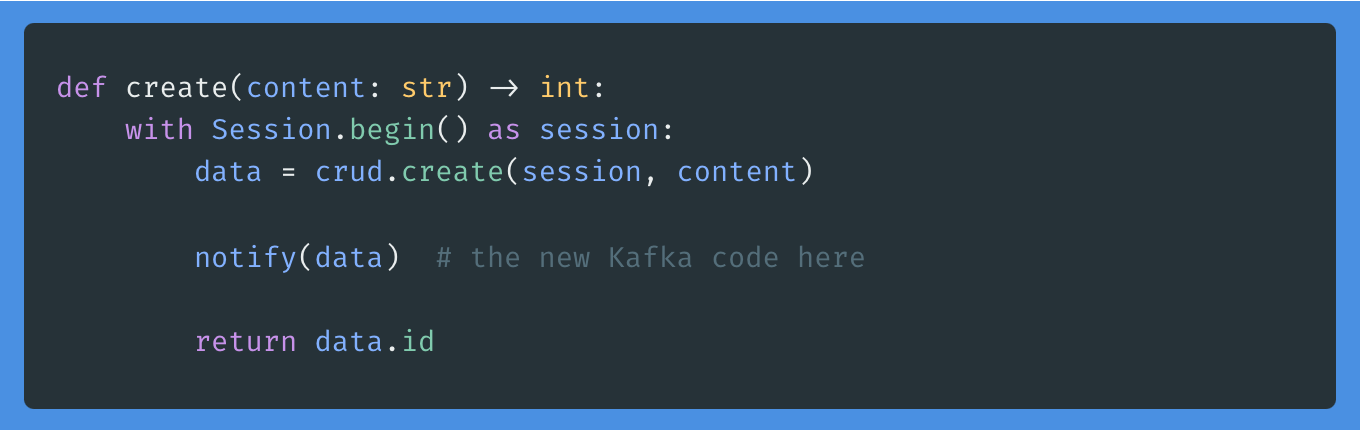
I'll continue the development, by adding the newly created kafka component. While developing, I realize that I need to transform the data into simple data structures - and remember that I already have a component that can be used here. This is where Polylith really shines: developing these kind of smaller bricks makes it easy to re-use them in other places - just by importing them.
Consuming messages

I have the kafka component with a consumer in it, and now is the time when I create a new base: the entry point for my kafka consumer.

This is the code I add to the base. Note the re-use of another already existing Polylith component (the log).

from example import kafka, log

logger = log.get_logger("Consumer-app-logger")


def parse_message(topic: str, key: str, value: str):
    logger.info(f"Consumed message with topic={topic}, key={key}, value={value}")


def main():
    topic = "message"
    kafka.consumer.consume(topic, parse_message)

Adding a project

I now have all code needed for this feature. What is left is to add the infrastructure for it, the actual deployable artifact. This command will create a new entry in the projects folder.

projects/
  consumer_project/
    pyproject.toml

I'm adding the dependencies and needed packages to the project-specific pyproject.toml file. But I am lazy, and will only add the base in the packages section - and then run poetry poly sync. It will add all needed bricks for this project. The poly tool has some magic in it, yes.

When deploying, just use the build-project command to package it properly without any relative paths, and use the built wheel to deploy it where you want it running. That's all!

In this article, I have written about the usage of Polylith when developing features and services, and Kafka messaging in specific. Adding new features & re-using existing code is a simple thing when working in a Polylith workspace. Don't hesitate to reach out if you have feedback or questions.

Additional info

Full example at: python-polylith-example
Docs about Polylith: Python tools for the Polylith Architecture

Top photo by Thomas Peham on Unsplash

Friday, July 21, 2023

Python FastAPI Microservices with Polylith

I like FastAPI. It's is a good choice for developing Python APIs. FastAPI has a modern feel to it, and is also easy to learn. When I think about it, I could say the same about Polylith.

Modern Python Microservices

Building Python services with FastAPI and Polylith is a pretty good combination. With FastAPI, you'll have a modern framework including tools like Pydantic. The simplicity of the Polylith Architecture - using bases & components - helps us build simple, maintainable, testable, and scalable services.

You will have a developer experience without the common Microservice struggles, such as code duplication or maintaining several different (possibly diverging) repositories.

Getting started

Okay, let's build something. I will write a simple CRUD service that will handle messages. Since I'm starting from a clean sheet, I can choose where to begin the actual coding. I'd like to start with writing a function in a message module, and will figure out the solution while coding. The Polylith tooling support (totally optional) will help me add new code according to the structure of architecture. I already have a Workspace prepared, have a look at the docs for how to set up a Polylith Workspace. Full example at: python-polylith-example

Great! Now I have a namespace package that is ready for coding. I'll continue with writing a create function. While working on it, I realize I need a persistent storage. I decide to try out SQLAlchemy and the Session thing.

def create(content: str) -> int:
    with Session.begin() as session:
        data = crud.create(session, content)
        return data.id

Again, I will use the poly tool to create a database component, where I will put all the SQLAlchemy setup along with a model and the function where data is added to the DB.

def create(session: Session, content: str) -> Message:
    data = Message(content=content)

    session.add(data)
    session.flush()

    return data

In this example, I will go for SQLite to keep things simple. Use your favorite data storage here.

from sqlalchemy import create_engine
from sqlalchemy.ext.declarative import declarative_base
from sqlalchemy.orm import sessionmaker

DATABASE_URL = "sqlite:///./sql_app.db"
DATABASE_ARGS = {"check_same_thread": False}

engine = create_engine(DATABASE_URL, connect_args=DATABASE_ARGS)
Session = sessionmaker(autocommit=False, autoflush=False, bind=engine)
Base = declarative_base()

I now have the basics done and am ready to write the endpoint.

I could (of course) also have started from the endpoint, if I wanted to. Polylith allows you to postpone design decisions until you are ready for it.

Before continuing, I will add the components to the packages section of the workspace pyproject.toml:

packages = [
    {include = "my_namespace/database", from = "components"},
    {include = "my_namespace/message", from = "components"},
]

The Base Plate

API endpoints are recommended to have in what is called a base in Polylith. The idea is very much like LEGO, when building things with bricks and place them on a base plate. Yes, the FastAPI endpoint is the base plate. I will create a new base with the poly tool, and add the FastAPI code in there. It will import the message component I wrote before, and consume the create function.

@app.post("/message/", response_model=int)
def create(content: str = Body()):
    return message.create(content)

Just as with the components, I will add the base to the packages section of the pyproject.toml:

{include = "my_namespace/message_api", from = "bases"},

I can now try out the API in the browser (I have already added the FastAPI dependency). Developing & trying out code is normally done from the development area (i.e. the root of the workspace). This is where you have all the things set up, all code and all dependencies in one single virtual environment. This is a really good thing for a nice Developer Experience.

Reusing existing code

I realize that I need something that will log what is happening in the service. Luckily, there's already a log component there that was added before, for a different service. I'll go ahead and import the logger into my endpoint and start logging.

✨ This is where Polylith really shines. ✨ The components that you develop are ready to be re-used already from start. There's no need to extract code into libraries or doing something additional. All previosly written components are already there, and you just add them to your project. You might think that the logger is a silly little thing? Yes, it is. But this is only a simple example of code that is shared between projects in a Polylith Workspace.

The Project

There's one important part missing, and that is the project. A project is the artifact that will be deployed. It is a package of all project-specific code, along with project-specific configuration. Using the poly tool and adding the base to the project-specific pyproject.toml. Note the relative path to the bases folder.

packages = [
    {include = "my_namespace/message_api", from = "../../bases"},
]

I'm feeling lazy and will use the poly tool to add the other needed bricks for this specific project (components and bases are often referred to as bricks). The poly tool will analyze the imports and add only the ones needed for this project when running the poetry poly sync command. There's also a check command available that will report any missing bricks.

You still need to add the third party dependencies, though. There's limits to the magic of the poly tool 🪄 🧙. To keep track on what is needed in the bricks, you can actually run poetry poly check again. It will notify about the usage of SQLAlchemy in the bricks. You can use the poly check command during development to guide you in the dependencies actually needed for this specific project.

Add sqlalchemy to the [tool.poetry.dependencies] section manually. You can update the lock-file for the project by running the builtin Poetry command:

poetry lock --directory projects/message_fastapi_project

All project-specific dependencies should now be set up properly! When packaging the project, simply run the poetry build-project (with --directory projects/my_message_fastapi_project if you run the command from the workspace root). You can use the built wheel to deploy the FastAPI service. It contains all the needed code, packaged and re-arranged without any relative paths.

What's in my Workspace?

Check the state of the workspace with poetry poly info command. You will get a nice overview of the added projects, bricks and the usage of bricks in each project.

In this article, I have written about the usage of Polylith when developing services. Adding new services is a simple thing when working in a Polylith workspace, and the tooling is there for a nice Developer Experience. Even if it sometimes might feel like a superpower, it's basically only about keeping things simple. Don't hesitate to reach out if you have feedback or questions.

Additional info

Full example at: python-polylith-example
Docs about Polylith: Python tools for the Polylith Architecture

Top photo by Yulia Matvienko on Unsplash

Monday, July 17, 2023

GCP Cloud Functions with Python and Polylith

Running a full-blown 24/7 running service is sometimes not a good fit for a feature. Serverless functions (also known as Lambdas or Cloud functions) is an alternative for those single-purpose kind of features. The major cloud providers have their own flavors of Serverless, and Cloud Functions is the one on Google Cloud Platform (GCP).

GCP Cloud Functions & Polylith

Polylith is good choice for this. The main use case for Polylith is to support having one or more Microservices, Serverless functions or apps, and being able to share code & deploy in a simple and developer friendly way.

One thing to notice is that GCP Cloud Functions for Python expects a certain file structure when packaging the thing to deploy. There should be a main.py in the top directory and it should contain the entry point for the function. Here's an example, using the functions-framework from GCP to define the entry point.

  import functions_framework
  

  @functions_framework.http
  def handler(request):
      return "hello world"
  

You'll find more about Python Cloud Functions on the official GCP docs page.

In addition to the main.py, there should also be a requirements.txt in the top folder, defining the dependencies of the Cloud function. Other than that, it's up to you how to structure the code.

   /
   main.py
   requirements.txt
  

How does this fit in a Polylith workspace?

I would recommend to create a base, containing the entry point.

    poetry poly create base --name my_gcp_function
  
Never heard about Polylith? Have a look a the documentation.

Polylith will create a namespace package in the bases directory. Put the handler code in the already created core.py file.

Make sure to export the handler function in the __init__.py of the base. We will use this one later, when packaging the cloud function.

    from my_namespace.my_gcp_function.core import handler

    __all__ = ["handler"]
  

If you haven’t already, create a project:

    poetry poly create project --name my_gcp_project
  

Just as with any other Polylith project, add the needed bricks to the packages section.

 [tool.poetry]
 packages = [{include=”my_namespace/my_gcp_function”,from="../../bases"}]
    

 # this is specific for GCP Cloud Functions:
 include = ["main.py", "requirements.txt"]
  

Packaging a Cloud Function

To package the project as a GCP Cloud Function, we will use the include property to make sure the needed main.py and requirements.txt files are included. These ones will be generated by a deploy script (see further down in this article).

Just as we normally would do to package a Polylith project, we will use the poetry build-project command. Before running that command, we need to make some additional tasks.

Polylith lives in a Poetry context, using a pyproject.toml to define dependencies, but we can export it to the requirements.txt format. In addition to that, we are going to copy the "interface" for the base (__init__.py) into a main.py file. This file will be put in the root of the built package. GCP will then find the entry point handler function.

To summarize:

  • Export the dependencies into a requirements.txt format
  • Copy the interface into a main.py
  • run build-project
Depending on how you actually deploy the function to GCP, it is probably a good idea to also rename the wheel that has been built to "function.zip". A wheel is already a zipped folder, but with a specific file extension.

 # export the dependencies
 poetry export -f requirements.txt --output requirements.txt
   
 # copy the interface into a new main.py file
 cp ../../bases//messages_gcp_function/__init__.py ./main.py

 # build the project
 poetry build-project
   
 # rename the built wheel
 mv dist/my_gcp_function_project-0.1.0-py3-none-any.whl dist/function.zip
 

That's all you need. You are now ready to write & deploy GCP Cloud Functions from your Polylith workspace. 😄

Additional info

Full example at: python-polylith-example
Docs about Polylith: Python tools for the Polylith Architecture

Top photo by Rodion Kutsaiev on Unsplash

Sunday, April 30, 2023

Dad Jokes & Python Developer Experience

"What do you call a Frenchman wearing sandals?"

"Philippe Flop." 🥁 👴 😆
Developer Experience, what does that even mean?

For me, a huge part is to quickly being able to write, try out and experiment with code. In Python, that could be about having the dependencies and paths already set up, to easily run snippets in a REPL or in the IDE, and without it crashing because of some missing dependencies or configs.

Testable code

When I develop a new feature, I usually want to run & evaluate the code very early in the process. Maybe I'm working on parsing something, transforming or filtering out data: that's when I want to evaluate the code, while writing and figuring out how to solve the actual problem. I do this to verify the output and get ideas about how to refactor the code. I practice a thing called REPL Driven Development, and have written about it before. The workflow is a form of TDD and the refactoring part comes natural with this kind of workflow.

Reusable & Composable code

Another important thing for me is to have already existing code nearby and available to use again. I usually think of Python code as building blocks, like LEGO, and try to have that in mind when writing new functions and adding features. I have learned that from functional programming and it is helping me to solve problems using a step-by-step approach.

With building blocks, code is composable and is ready for re-use from start.

"What did Yoda say when he saw himself in 4K?"

"HDMI." 🥁 👴 😆

Delay Design Decisions

I don't think it is that important to put code in the right place from start (such as what kind of service or app, domain, repo or a folder). At least it isn't as important as writing code that can easily be moved from one place to another. Very related to the building blocks & LEGO way, mentioned above. This approach will likely lead to less wasted time & less design-upfront planning. It is easier to figure it out the proper place to put the code eventually, while iterating and developing. In my opinion, it is perfectly alright to rename or move around code while developing. It shouldn't be a difficult thing to do that.

I usually like to dive into a feature and start coding, rather than starting off by deciding name of a repo, or what type of service the feature should exist in. These things can be left to decide later, when learning more about what to actually build.

"Where do dads store their dad jokes?"

"In the Dadabase." 🥁 👴 😆

A Developer Friendly Architecture

The Polylith Architecture targets all of these things. During the development you have all code available for experimentation and you compose already existing code with new when building features. All code in a Polylith workspace is referenced as bricks, and you use them just as when building something with LEGO. Pick the ones you need along with writing new ones, and combine them into features. A brick can be used in several apps, services or projects as it is called in Polylith.

During development, you have one single virtual environment, with all paths and dependencies already set up. You also have a separate section especially made for trying out and experimenting. It is very similar to the scratch files in PyCharm, but they are versioned and included in the repo. These ones are very useful for evaluating code.

You can immediately dive in to writing code and push the decision about deployment into the future if you like. Add the project to the Polylith workspace, using a simple command, when you are ready for it.

A Dad Joke microservice

To get some insights in how Polylith and the Python tooling changes the way you develop and improves the Developer Experience, I have recorded an improvised video with live coding. Phew, it is difficult to speak & code at the same time. 😅

In this video, I'm taking the first steps into developing some kind of Dad Joke Service and use the Development Environment of Polylith to figure out how to build it.


Top photo by Toa Heftiba on Unsplash

Tuesday, November 22, 2022

The last Python Architecture you will ever need?

Should features live in several independent Microservices, or is a Monolith the way to go? What kind of setup is the best one for the code in a repo? Organizing is difficult.

"... I'll just put it in a utils folder for now ..."

There's a thing called Polylith. I've written about different aspects of it before. Polylith is an architecture (and a tool) focusing on the Developer and Deployment experience. It is developed by Joakim Tengstrand, Furkan Bayraktar and James Trunk.

The Polylith Architecture is a fresh take on how to share code, and offers a nice and simple solution to the Monolith vs Microservice tradeoffs. In addition to that, it is a good fit for functional programming. Some time ago, I got an idea: how about bringing a couple of the good things from there to here? So I developed something that I believe could be useful for many Python teams out there.

I already released a preview in early 2022, it was missing some essential features and the great developer experience wasn't really there yet. Also, I had little knowledge about how to package Python apps & libraries, but have learned a lot since then.

Today, I believe the Python tools for the Polylith Architecture is ready to use in the Real World. You will find version 1 on PyPI.

A couple of Poetry plugins

I have developed it as two different Poetry plugins. One of them - the Multiproject plugin - adds support for workspaces to the popular Poetry tool, by adding a new command called build-project.

The second one - Polylith plugin - adds useful tooling support for the Polylith Architecture itself. With the tooling, you can add components & projects in a simple way and also keep track of what's happening in the workspace.

Have a look at the repo and the docs.

An Architecture well suited for Monorepos

Polylith is using a components-first architecture. The components are building blocks, very much like LEGO. The code is separated from the infrastructure and the building of artifacts. This may sound complicated, but it isn't.

In a way, it is about:
  1. thinking about code as LEGO bricks, that can be combined into features.
  2. making it easy to reuse code across apps, tools, libraries, serverless functions and services.
  3. Keeping it simple.
Have a look at these introductory videos, describing Polylith in Python and the tooling support:


Python with the Polylith Architecture


The Poetry Polylith Plugin


Give it a try! I would love to hear you feedback.


Top photo by frank mckenna on Unsplash