Showing posts with label Reagent. Show all posts

Monday, September 13, 2021

ClojureScript. Amplified.

"… we're going to build a web app with storage, authentication and everything …"

But how?

My favorite building blocks 🤩

I have tried out some tools that I find very useful. As you may have guessed, the code is developed with ClojureScript. A language I appreciate more each day. Developing an app, without the Interactive REPL? That would be taking a huge step backwards.

I have found that Material-UI works really well in the development of the app I'm working on. The components library cover many usage scenarios, it is well documented and there's a lot of code examples to learn from.

Recently, I added Storybook and really like the idea of developing user interfaces according to Component Driven Design. It reminds me of how I experiment with code using Test Driven Development. Just like TDD, I think tools like Storybook and Devcards changes the way we develop, to the better. Start small & build quality in.

Let's begin with a building block from my favorites list: AWS Amplify.

A basic setup for AWS Amplify & ClojureScript

The official AWS Amplify documentation is all about JavaScript. In this post, and in this example code repo, you will find a ClojureScript setup that I think will get you up & running quickly. First, set up AWS Amplify by following the first parts of the Official getting started guide. You will be creating an AWS account and installing a CLI to initialize your setup.

If want more details, have a look at Hey Webpack, Hey ClojureScript. It's a post describing a ClojureScript & Amplify specific setup that is used in the example repo.

Start coding, but where? 🤔

A pitfall might be where to place the auto generated client code from Amplify. I usually put files like the aws-exports.js at the same level as the root namespace.

In the example code repo, the ClojureScript source code lives in the src/main folder. That's also where I've added the aws-exports.js file.

Configure Amplify in the init function of your app.

Login & Logout with ClojureScript & the Amplify CLI

Adding authentication can easily be done by using the Amplify CLI.

From the docs:

"... The Amplify CLI supports configuring many different Authentication and Authorization workflows, including simple and advanced configurations of the login options, triggering Lambda functions during different lifecycle events, and administrative actions which you can optionally expose to your applications ..."

Use the Auth features in Amplify UI

There's a very useful Higher-Order React Component (aka HOC) in the AWS Amplify UI Library, that will render login and signup views.

I've chosen this less-lines-of-code approach by using the withAuthenticator HOC. To customize things like signup fields or styling, there is also a fully customizable Authorization component available in the Amplify UI library. Or you can use your own components.

The views entry point.
The passed in component is wrapped in the withAuthenticator HOC.

If you already have browsed the code in my example repo, you may have noticed the Reagent reactify-component and as-element functions. These functions are needed when passing components between ClojureScript and JavaScript.

Read more about React Components, elements and instances and how the interop is done with Reagent.

Create, read, update and delete

So far, we have used built in features that will render UI views and handle all auth communication with a backend service. To store, read and update data, we can use the Amplify API feature. Use the CLI to create a backend:

I have chosen GraphQL in my example code, but there's also a REST API option. When using GraphQL, all you need to do is to define data models. Amplify will create the backend infrastructure according to your models. In a matter of minutes, there are AWS AppSync endpoints & DynamoDB tables created for your app.

GraphQL

Here's a GraphQL model. An authenticated user should be able to add data to the profile, like a summary or an "About me" text. The user will be able to create, delete and update the data in the profile. Other authenticated users can read the data when they visit the user's profile.

The schema files belongs to the backend, and lives in the amplify folder of your repo.

async ClojureScript

The Amplify Client Library handles the communication with the backend services. All calls are asynchronous. In ClojureScript, you can use core.async. I haven't yet dig into the core.async stuff, so I'm using Promises here. I think it's a quite straight forward approach.

The data going through the wire is JSON. To make the developer experience better, I think it might be a good idea to add conversion functions to-and-from Clojure data structures. Like this one, converting user settings JSON to Clojure data:

Read more about the ^js type hints in ClojureScript.

Finally: Ship it! 🚢

Here's an excerpt from an amplify.yml that defines the build steps. If you add a definition file in your repo, AWS Amplify will use it in the CI/CD process.

This is the amplify.yml that I use in my example code repo.

There's more details at the official AWS docs about build settings and about amazon-linux-install.

Add UI building blocks to the amplified app

Now we have our amplified ClojureScript app. Let's add UI building blocks from Material-UI, a library that is very popular in the JavaScript & React ecosystem. Here, I'm using it via a ClojureScript library called reagent-material-ui. The library makes it possible to write components using Clojure data structures. You can read more about Material-UI and ClojureScript in my previous post Material Design in a Functional World.

Totally unnecessary css styling used here, but why not?

Testing the UI building blocks with ✨ Storybook ✨

I find Storybook very useful when experimenting with components and user interfaces in isolation. Being able to focus on one specific thing. There's many different aspects of developing an app, and it is sometimes difficult to handle all of them at the same time.

Storybook is a place for trying out things like css, styling, different viewports and UI events. You won't try out the AWS Amplify code here. The Interactive REPL is a better tool for that.

You'll find more about Storybook in Component Driven ClojureScript with Storybook.

Finally, check out my GitHub repo for ideas on how to create apps with the building blocks AWS Amplify, Material-UI, Storybook and ClojureScript.

That's a combination I'd like to call ✨ClojureScript. Amplified. ✨


Top photo by Drew Patrick Miller on Unsplash

Thursday, September 2, 2021

Material Design in a Functional World

"... Material is a design system created by Google to help teams build high-quality digital experiences for Android, iOS, Flutter, and the web ..."
from material.io

ClojureScript & React is A 💕 Story

With Clojure, you can write functional & minimalistic code. With ClojureScript and Reagent, you can write functional & minimalistic React components. By adding re-frame to it, we also have a powerful way of handling state changes and triggering events.

The code you write in ClojureScript is instantly compiled to JavaScript React components that runs in your browser. The entire JavaScript ecosystem is available with this kind of setup.

"... React components for faster and easier web development. ..."
from material-ui.com

Material-UI

Material-UI is a very popular React framework. And we can use it with ClojureScript. But the JavaScript interop can sometimes be bit of a hassle. Fortunately, there is a great ClojureScript library called reagent-material-ui that simplifies this a lot.

One thing to notice is that the Material-UI components use React Hooks heavily to inject styling and theming into components. This is something to think about when using Reagent. Basically, just use the functional component syntax [:f> my-component] and you’re all good.

Have a look at the reagent-material-ui docs about common pitfalls in the React/Reagent interop and a fully working example in this GitHub repo.

Storybook: a playground for components

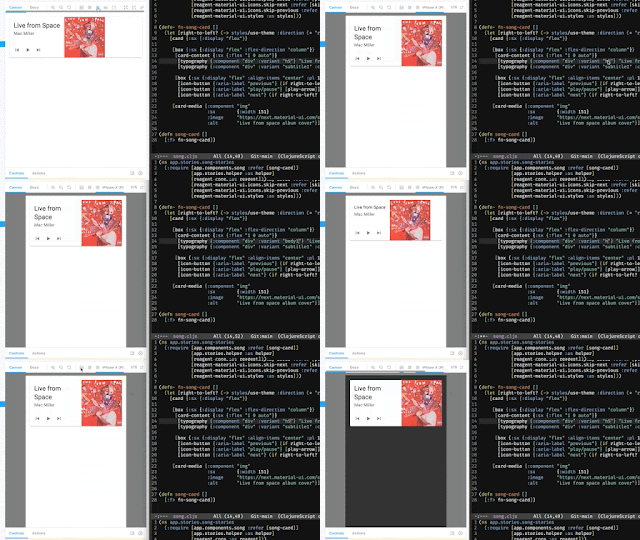
Here’s me playing around with the Card component, using ClojureScript and Storybook. I describe the Storybook integration in detail in this post.

The source code is available at GitHub.

No copy-paste?

I guess it can be a bit overwhelming for a Clojure developer to look at example code from the Material-UI site, with JavaScript/JSX syntax that is quite verbose (you’ll be even more overwhelmed by the TypeScript examples).

A JavaScript developer would probably copy-paste the example code and make some adjustments. We can’t do that. But it is worth the effort writing the code from scratch when discovering that the result is way more simplistic than the original. The amount of code written is usually half the size of the original JavaScript code. Yeah, that’s Clojure!

ClojureScript to the left, JavaScript to the right. Less is more.

Check out my GitHub repo with examples on how you can implement Material-UI components in ClojureScript, with hooks and styles - while having fun writing functional code.


Top photo by Thierry Lemaitre on Unsplash

Sunday, August 29, 2021

Hey Webpack, Hey ClojureScript

✅ ClojureScript is great.

✅ AWS Amplify is great.

🤔 Why are there errors in my browser console?

ClojureScript. Amplified.

Some time ago, I decided to give AWS Amplify a try for a new project. With Amplify, you can quickly create and deploy web apps and AWS backend services by using your command line.

Even though the Amplify code examples and docs are all about JavaScript, I wasn't too keen on abandoning my favorite REPL powered language: Clojure. 🤩

So, I decided to combine two great things: AWS Amplify & ClojureScript!

Amplifed, yes. But with 🔔.

I have learned a lot from this blog post by Robert J Berger about how to setup AWS Amplify with ClojureScript. New versions of the AWS Amplify libraries are released regurarly. The current Major version include breaking changes that probably will cause ClojureScript web apps to raise errors and stop working.

Until recently, I have had to rollback updates and use earlier versions of the Amplify libraries. Nothing wrong with that. But my inner Alarm Bells have been ringing constantly since noticing the word legacy in the official Amplify docs for those library versions (the aws-amplify-react library and the Amplify Auth feature in particular).

The newer Amplify libraries rely on Webpack specific features under the hood. The example setup described in the official Amplify docs include using react-scripts, that (if I'm not mistaking) will package code with Webpack. That kind of setup is not supported by shadow-cljs, a tool that is very common in ClojureScript projects.

Breaking things

In addition to being stuck using legacy code, the app will break each time I add a third party library from npm. I have learned that it is caused by not having a fixed version for amplify libraries defined in my package.json file. A quick fix is to set all AWS Amplify libraries to a fixed version and use that one forever. A version that is becoming more legacy for each day. 🔔🔔🔔

Fix the broken things

The main issue with AWS Amplify libraries, ClojureScript and shadow-cljs is described in this GitHub thread. There is also a suggested solution hinted by Thomas Heller, the creator of shadow-cljs.

A solution: shadow-cljs & Webpack working together

I have created an example app using AWS Amplify and ClojureScript in this repo. Here, shadow-cljs will only create a target JavaScript file containing requires to all of the third party JavaScript dependencies.

Webpack will use that target to create a JavaScript bundle. In a continuous deploy environment, this can easily be automated by executing two scripts instead of one (the shadow-cljs build and webpack).

This solution makes it possible to use the very latest versions of the AWS Amplify libraries, without any css quirks or being forced to use legacy code. Hey Webpack, Hey ClojureScript!

Nowadays, my inner alarm bells are nice & quiet.

Photo by Kamil Pietrzak on Unsplash

Monday, January 11, 2021

Simple (within parentheses)

  • - Hey, what's ClojureScript?
  • - It's a thing that compiles Clojure to JavaScript.
  • - I get it. What's Clojure?
  • - It's a Lisp.
  • - ???
  • - You know, a functional programming language that uses a lot of parentheses.
  • - I … get it? 🤯

Don't worry. In this post, I will share some of the basics that I have learned about Clojure and ClojureScript.

Clojure?

With Clojure, you can write simple, functional and minimalistic code. Some of the cool things with Clojure are:

  • data is immutable
  • the REPL is a powerful tool
  • few keystrokes to make things happen

Clojure runs on top of Java, suitable for all kinds of "backend" things. It also runs on top of JavaScript. Yes, JavaScript - making it possible to develop all kinds of apps, tools, products and websites. There's even an option to run in a .NET runtime, but I haven’t tried out that one yet.

What does it look like?

Even though the syntax may look unfamiliar, you can already see in this silly example the less amount of keystrokes needed using Clojure, compared to JavaScript.

Parenthesis?

Everything you write in Clojure is a list, wrapped in parentheses. That may sound weird. I agree, it is weird. But your eyes will get used to it. In short, the format of writing something in Clojure is:

(operator operands) or even (function arguments)

Here is an example:

... and how it would be written in JavaScript:

If all this is new to you, you might have this expression in your face right now: 😬

That is perfectly normal. I have looked like that a lot during 2020. When digging deeper, you may need to go through The 12 Stages of Learning Clojure.

ClojureScript?

With ClojureScript, you develop web apps and write simple React components. You write code in Clojure, compile it to native JavaScript and run it in your favorite browser. The compilation happens all the time and automagically as you type.

Just like with Java or .NET in the backend, ClojureScript has native access to JavaScript. You can use and interact with your favorite npm packages and React components just as you would with JavaScript.

Reagent and React

I'm going to fast-forward a bit by adding a ClojureScript library called Reagent. With Reagent, you write React components but with Hiccup instead of JSX. Wait, what?

View components are built up using Clojure data structures. The example above creates html elements with Clojure vectors and keywords. This style is called Hiccup. It will save you a lot of keystrokes and you'll have a lot less of scrolling in your code editor.

What about state?

I'll fast-forward again by adding a very nice library called re-frame.

From the re-frame docs:
“... It has reactivity, unidirectional data flow, pristinely pure functions, interceptors, coeffects, conveyor belts, algebraic effects, statechart-friendliness and claims an immaculate hammock conception. All while being both simple and easy. ...” 💥🤯💥

With re-frame, data is stored in one place called the "app db". Your components will fire events and subscribe to changes in the app db. The cool thing is that you write code in a sequential way, making it very readable and easy to understand. However, the syntax of the actual events and subscriptions might take a while to understand, at least if you are new to Clojure in general.

Here, we have a Reagent component that adds a button component, only when the app is disconnected. It is subscribing to changes of disconnected in the app db. React will re-render the components when the app state has changed.

Cool, but can I use my favorite editor?

Yes, most likely. I know there are Clojure plugins for VS Code, Atom, Sublime Text and intelliJ. I use Emacs, because ... I just like it.

There is something important and special going on with developers and their text editors. I think you will be able to find your favorite dev setup. I also think that you will learn a lot of new programming concepts and styles when reading more about this cool language and its libraries.

Photo by Marcos Paulo Prado on Unsplash