Showing posts with label Component Driven. Show all posts

Tuesday, November 22, 2022

The last Python Architecture you will ever need?

Should features live in several independent Microservices, or is a Monolith the way to go? What kind of setup is the best one for the code in a repo? Organizing is difficult.

"... I'll just put it in a utils folder for now ..."

There's a thing called Polylith. I've written about different aspects of it before. Polylith is an architecture (and a tool) focusing on the Developer and Deployment experience. It is developed by Joakim Tengstrand, Furkan Bayraktar and James Trunk.

The Polylith Architecture is a fresh take on how to share code, and offers a nice and simple solution to the Monolith vs Microservice tradeoffs. In addition to that, it is a good fit for functional programming. Some time ago, I got an idea: how about bringing a couple of the good things from there to here? So I developed something that I believe could be useful for many Python teams out there.

I already released a preview in early 2022, it was missing some essential features and the great developer experience wasn't really there yet. Also, I had little knowledge about how to package Python apps & libraries, but have learned a lot since then.

Today, I believe the Python tools for the Polylith Architecture is ready to use in the Real World. You will find version 1 on PyPI.

A couple of Poetry plugins

I have developed it as two different Poetry plugins. One of them - the Multiproject plugin - adds support for workspaces to the popular Poetry tool, by adding a new command called build-project.

The second one - Polylith plugin - adds useful tooling support for the Polylith Architecture itself. With the tooling, you can add components & projects in a simple way and also keep track of what's happening in the workspace.

Have a look at the repo and the docs.

An Architecture well suited for Monorepos

Polylith is using a components-first architecture. The components are building blocks, very much like LEGO. The code is separated from the infrastructure and the building of artifacts. This may sound complicated, but it isn't.

In a way, it is about:
  1. thinking about code as LEGO bricks, that can be combined into features.
  2. making it easy to reuse code across apps, tools, libraries, serverless functions and services.
  3. Keeping it simple.
Have a look at these introductory videos, describing Polylith in Python and the tooling support:


Python with the Polylith Architecture


The Poetry Polylith Plugin


Give it a try! I would love to hear you feedback.


Top photo by frank mckenna on Unsplash

Tuesday, August 2, 2022

A simple & scalable Python project structure

File & folder structures - there's almost as many different variations as there are code repositories.

One common thing though, is that you'll probably find the utils folder in many of the code repos out there, regardless of programming language. That's the one containing the files that don't fit anywhere in the current project structure. It is also known as the helpers folder.

Organizing, sorting and structuring things is difficult. There's framework specific CLIs and tools that will create a nice setup for you, specialized for the needs of the current framework.

"There should be one-- and preferably only one --obvious way to do it."
The Zen of Python

Is there one folder structure to rule them all? Probably not, but I have tried out a way to organize code that is very simple, framework agnostic and scalable as projects grow.

Structure for simplicity

A good folder structure is one that makes it simple to reuse existing code and makes it easy to add new code. You shouldn't have to worry about these things. The thing I've tried out with success is very much inspired by the Polylith architecture. Polylith is a monorepo thing, but don't worry. This post isn't about monorepos at all, however this one is if you are interested in Python specific ones.

An entry point and a components folder. You won't need much more. Use your favorite dependencies tool, mine is currently Poetry.

It's all about the components

The main takeaway here is to view code as small, reusable components, that ideally does one thing only. A component is not the same thing as a library. So, what's the difference?

A library is a full blown feature. A component can be a single function, or a parser. It can also be a thin wrapper around a third party tool.

"Simple is better than complex."
The Zen of Python

I think the idea of writing components is about changing mindset. It is about how to approach a problem and how to organize the code that solves a problem.

It shouldn't be too difficult to grasp for Python developers, though. For us Python devs, it's an everyday thing to write functions and have them in modules. Another useful thing, probably more common in library development, is to group the modules into packages.

Modules, packages, namespaces ... and components?

In Python, a file is a module. One or more modules in a folder becomes a package. A good thing with this is that the code will be namespaced when importing it. Where does the idea of components fit in here? Well, a component is a package. Simple as that.

"Namespaces are one honking great idea -- let's do more of those!"
The Zen of Python

To make a package easier to understand, you can add an interface. Interfaces are well supported in Python. Specifying the interface of a package in an __init__.py file is a great way to make the intention of the code clearer and easier to grasp. Maybe there's only one function that makes sense to use from the "outside"? That's when to use an interface for your component.

Only the functions that makes sense should be exposed from a component.

Make code reuse easy

When organizing code into simple components, you will quickly discover how easy it is to reuse it. Code is no longer hidden in some utils folder and you no longer need to duplicate existing private helper functions (because the refactoring might break things), if they already are organized as reusable components with clear and simple APIs. I usually think of components as LEGO bricks to select from when building features. You will most likely produce new LEGO bricks of various shapes along the way.

This is code in a "dictionaries" component. The interface (previous picture) will handle the access to it.

Well suited for large apps

At work, we have a couple of Python projects using this kind of structure. One of them is a FastAPI app with an entry point (we named it app.py) containing the public endpoints. The entry point is importing a bunch of components that does the actual work.

The repo contains about 80 Python files. Most of them are grouped into components (in total about 30 components). This particular project is about 3K lines of Python code, but other repos are much smaller with only a handful of components.

Perfect for functional programming

Even though it is not a requirement, organizing code into components fits very well with functional programming. Separating code into data, calculations and actions are well suited for the component thing described here in this post.

Don't forget to keep the components simple, and try to view them as LEGO bricks to be used from anywhere in the app. You'll have fun while doing it too.


Top photo by Maureen Sgro on Unsplash

Wednesday, December 22, 2021

Simple Component Driven ClojureScript

That Component Driven thing

Component Driven is about developing user interfaces and apps in a certain way. In short, it is about grouping relevant code into components, combining compontents into features, combining features into views (or pages) - and combining the views into an app. I don't think it should be that much about the tools.

Just like Test Driven Development, Component Driven Development encourages us to start small. In a way, it also reminds of LEGO when combining building blocks into something useful.

As your app grows and the coding is done deeper into the app structure, developing user interfaces might be more of a challenge. Finding the spot where a new feature is to be added, might require some clicks and navigation. You know, stuff like logging in, a specific app state - or even waiting for data fetched from a third party service.

This is when the idea of Component Driven Development is really useful. To simplify and speed up the development, we need something simple to host our components. A UI that is isolated from any app specific state or dependencies. A place where a component can be rendered without the need to set things up. Having that, it is possible to develop a component in isolation and test it with different input.

Do I need a tool?

Storybook is a tool that will solve all of this, with a bunch of other really nice things like docs, previews, example usage, variants, code snippets and viewports. But it is possible to try out the Component Driven style of creating user interfaces, without going all-in with a new tool.

Start small

I’m suggesting a very simplistic approach, that will enable rendering components in a short-lived isolated view. You throw it away when done.

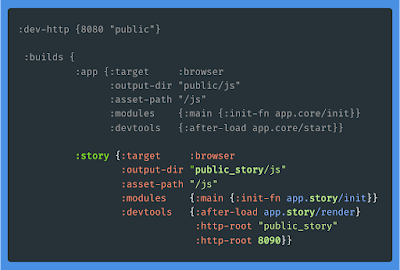
Here, I’m using shadow-cljs and have defined a new alias that is targeting a browser. I have also set entry points. A setup almost identical to the web app alias. This one will run in a separate port and the output is compiled to a separate public folder. In that one, I have copied the HTML template from the public folder used by the web app.

Click to enlarge the image, or browse an example gist here.

Keep it Simple

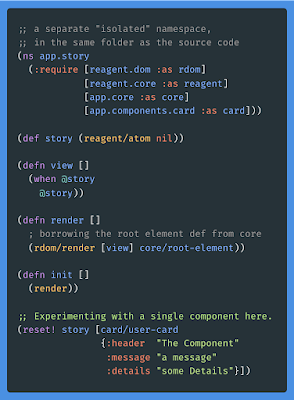
The entry point here is a simplistic and simplified version of the one used in the actual web app. But this entry point does only care about the component you are developing right now. Here is where you render and try out a component during development. This is a temporary place to work Component Driven. It’s almost like when evaluating code in a REPL, but with HTML and compiled JavaScript in a browser.

Click to enlarge the image, or browse an example gist here.

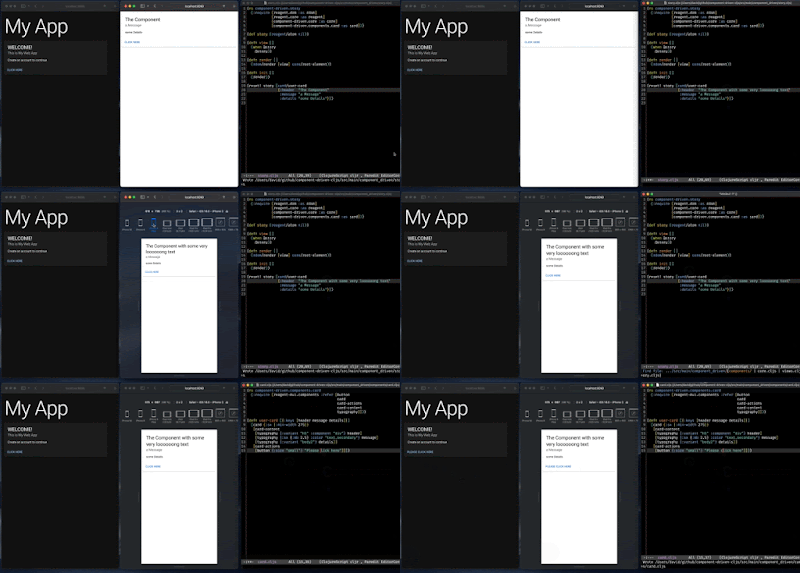
Run both aliases. The App in one browser folder, the component in a different one.

The browser is a powerful tool, with nice developer features.

Take it to the next level

At some point, you will probably want something more long-lived than this very simplistic scratch-style approach. That’s where Storybook fits in!

Component Driven ClojureScript with Storybook

With Storybook, you can focus on styling, different viewports and UI events when developing a single component. You write "stories" (i.e. running components in isolation), including documentation and lot of in-browser interactivity. The stories & docs can also be shared, by deploying it as a separate web app.

Recently, I talked about getting started with Storybook at the re:Clojure 2021 conference.

In this less than 25 minutes talk, I demo how you can use Storybook in your ClojureScript app and work Component Driven.

I hope you’ll like it!

Direct link to the Component Driven ClojureScript with Storybook video.


Top photo by Brett Jordan on Unsplash

Tuesday, August 31, 2021

Component Driven ClojureScript with Storybook

Component Driven?

Start small. Develop components in isolation. Don’t forget to pause & reflect on the code you’ve written. Can it be split into several small components?

✨ When you’re ready, combine your components to create features.

✨ Add the features to a view.

✨ Add the view to your app.

You can read more about Component Driven User Interfaces here.

Storybook

I’ve just begun to use Storybook and currently learning about it. What I especially like so far, is that the tool encourages you to write UI components that are independent … and functional?

This makes it possible to develop user interfaces in isolation. Just pass data and actions as parameters into your components. Keep it simple. This way of working reminds me a lot of Polylith, an architecture I have used in backend focused Clojure projects and that I enjoy a lot.

ClojureScript & Storybook?

You will find a fully working example in this repo. I have added Storybook to a ClojureScript web app, using shadow-cljs, with additional npm scripts located in package.json.

Update: a new version of shadow-cljs supports ns-regexp for the npm-module target. No need to manually add new stories!

The code in my GitHub repo is a continuation of the work I’ve described in an earlier post, about combining shadow-cljs with Webpack and AWS Amplify.

The Clojure Interactive REPL and Storybook working well together.

No JavaScript quirks?

Well, yeah some. The JavaScript ecosystem is evolving fast, tools are updated with breaking changes and sometimes that causes compatibility issues. In this case it is Storybook and Webpack 5. But I have solved it with a few extra rows of configuration. Don’t worry.

An example of a Storybook story written in ClojureScript

Have a look at the fully working example at GitHub.

Many thanks to Shaolang Ai, that wrote this blog post about shadow-cljs and Storybook that I’ve learned a lot from.


Top photo by Etienne Girardet on Unsplash